AroFlo is the best fit among construction apps for Australian builders and trade contractors who want quoting, scheduling, project costs, safety forms and invoicing in one app. It's purpose-built job management software for Australian and New Zealand tradies. Procore and Autodesk Forma suit large projects, Buildertrend suits builders with a busy project pipeline, Buildxact suits estimating-heavy builders, and Mitti, formerly SafetyCulture, suits safety inspections.
The right construction app depends on who works on your sites, how much of the job you run from a phone, and whether the app talks to your accounting software. The comparison below puts every option side by side.
Key takeaways
- For one app covering quotes, schedules, project costs, safety forms and invoices, builders and trade contractors get the strongest fit from AroFlo.
- Several large-project platforms sell by custom quote, so compare the full cost for your crew, not just a headline price.
- A few apps offer free plans or free starts, which makes them easy to trial on one site.
- Offline use varies a lot between apps, so check it before you roll an app out to regional sites.
- High risk construction work carries SWMS duties for the business doing the work, so pick an app that handles your safety forms.
What are the best construction apps for Australian builders?
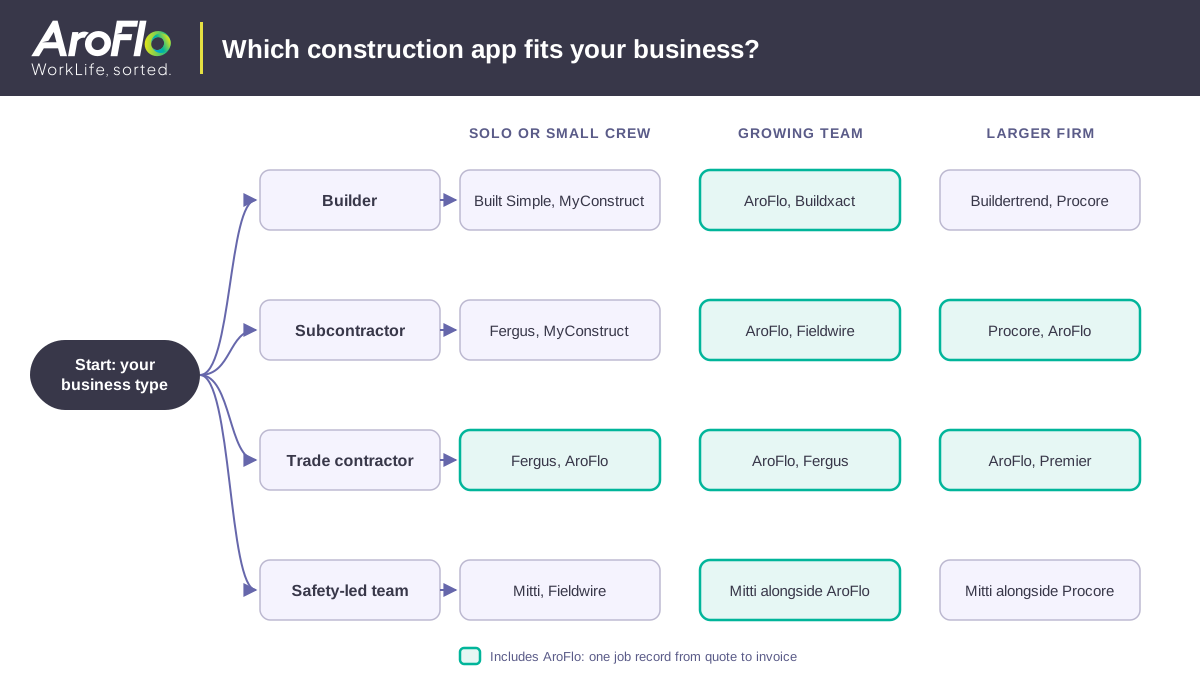
For one connected job record, the strongest construction app is AroFlo. Large head-contractor projects suit Procore or Autodesk Forma, busy builders suit Buildertrend, and estimating-heavy builders suit Buildxact. Site teams lean on Fieldwire or Raken, smaller businesses on Fergus, Built Simple or MyConstruct, safety inspections on Mitti, and construction accounting on Premier. The table compares them side by side.
How we chose these construction apps
AroFlo publishes this guide, so every app here, AroFlo included, faces the same tests. We compared each construction app on what matters to a builder on site: phone use, quote-to-invoice coverage, safety forms, offline use, and fit for Australian and New Zealand businesses. Prices come from each vendor's own website, shown as of November 2026.
Where a vendor sells by quote, the table says so rather than guessing a number, and we note GST where the vendor states it. Each best-for label is our judgment of the business type an app suits best, not a universal ranking.
AroFlo: best for all-in-one construction job management
AroFlo gives builders and trade contractors one construction app for quotes, schedules, project costs, safety forms and invoicing. It covers the full job lifecycle such as quoting, scheduling, dispatching, invoicing and compliance, all from one connected platform, and its construction tools track labour, materials and expenses against each project, for builders of every size.
Best for: builders, subcontractors and trade contractors who run more than one job at a time. AroFlo is built for trade businesses from sole traders to 40+ technician operations, and most customers can start small and grow on AroFlo without switching platforms.
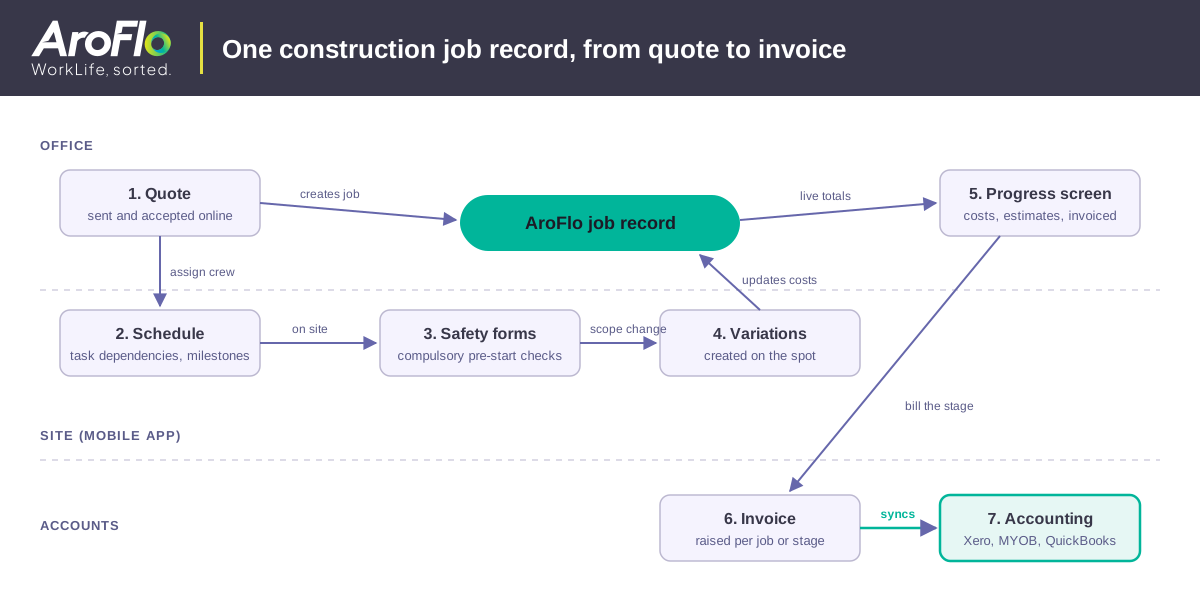
Projects and variations: AroFlo is invoicing and project management software for construction companies of all sizes, and its construction management software lets you set task dependencies and milestones for every project. The progress screen in its project management software shows current project costs, estimated values and the value invoiced from a single screen, and site staff create variations on the spot through a mobile device, laptop or PC.
Quotes and safety: the quoting and estimating app lets you send and accept quotes online. Its WHS and OHS compliance tools can make checklists and safety risk forms compulsory for all employees before work can commence, with inbuilt digital compliance at no extra cost.
Accounting: AroFlo integrates with Xero, MYOB and QuickBooks, plus Stripe, Square and Australian trade suppliers Reece and Rexel, and its integrations sync job data, invoices and payments automatically to reduce double-handling and admin.
The main con is connectivity. AroFlo requires only an internet connection to access your construction and building job index from anywhere, so check coverage on your regional sites before rollout.
Pricing: AroFlo starts at AUD $80 per user per month, with a minimum of three users, on a sliding scale where the per-user rate decreases as an organisation adds more user licenses.
Procore: best for large construction projects
Procore is the pick for big, document-heavy jobs with dozens of parties on site. It lets you manage construction projects from preconstruction to closeout, and you can still use many features of its mobile application in offline mode when a site has no signal. That breadth suits head contractors and developers who coordinate subcontractors, drawings and documents across large projects.
The downside for small firms is cost. Procore pricing starts with a custom quote, and Procore charges an upfront annual fee by product, based upon your Annual Construction Volume. Request a quote that reflects your users and annual project load, then compare it with per-user prices.
Autodesk Forma: best for drawings and project coordination
If drawings and models drive your week, look at Autodesk Forma. Autodesk Construction Cloud is now part of Autodesk Forma, which connects workflows, teams and data at every stage of construction. It fits builders, designers and project managers who need drawings, markups and coordination in one place.
Mobile users access PlanGrid projects through the Autodesk Forma mobile app on iOS and Android, so site crews keep plan access on a phone. The catch for new buyers is that PlanGrid is no longer available for purchase by net-new customers, so older guides that recommend PlanGrid are out of date. Forma pricing offers bundles such as Model Management through a Get a Quote request.
Buildertrend: best for builders running several projects a year
Buildertrend suits builders with a steady pipeline of work. By its own description, Buildertrend was built for builders who oversee 5+ projects a year or handle complex, multi-phase builds, which makes it a better fit for an established builder than for a sole trader working one job at a time.
Pricing transparency is the weak spot. Buildertrend offers a custom quote for the platform: you answer a few quick questions about your business, then schedule a call with its team before you can compare costs.
Buildxact: best for estimating and takeoffs
When estimating is the biggest admin job, Buildxact is a strong option. Its Foundation plan is $199/mo with unlimited users, lead management and digital takeoffs, and all Buildxact base plans and add-ons are priced excluding GST, where applicable. That makes it a better match for a busy estimator than for a crew that mainly needs site tools.
Connectivity is the trade-off on site. The Buildxact mobile app needs an active internet connection to log in and work, so crews in poor-coverage areas can't use it without signal.
Fieldwire: best for on-site task management
Fieldwire brings the whole site team into one collaboration app. Fieldwire says the entire project team, from site foreman to project manager, shares information in real time, and crews log markups and as-builts using mobile editing, even offline. It works well for foremen who coordinate defects lists and plan markups across trades.
Fieldwire makes trials easy, because the Basic plan is AUD 0 per user per month for small teams wanting to try out core features. Cost at scale is the downside: Fieldwire Pro is AUD 61 per user per month, billed annually, so costs grow with every collaborator who needs a paid seat.
Fergus: best for small-to-medium trade businesses
Fergus describes itself as job management software built for Aussie tradies, with local support across Australia and New Zealand by phone, live chat and email, included free. Its Offline Mode has come out of beta and rolled out to all users, which helps on regional sites with poor coverage. Fergus Essentials starts from $53 per month.
The con for builders is fit. Fergus pitches itself at tradies, so if you run staged builds, ask to see Gantt scheduling and progress claims in a demo before you commit your crews to it.
Raken: best for daily construction site reporting
Raken is built around reporting from the field. Its features include progress tracking, daily reports, collaborator reports and segmented daily reports, and Raken's pitch is that better projects start with the field. Raken Basic is $23 per user, or $69 total per month, with a minimum of 3 users, in USD billed annually.
The trade-off is scope and billing. Check whether you also need quoting and invoicing in a separate app, and remember that USD billing moves with the exchange rate for Australian buyers.
Mitti (formerly SafetyCulture): best for safety inspections and reports
Mitti focuses on site inspections and safety. Mitti, formerly SafetyCulture, has grown from a safety and inspections app into a system for running every site, shift and standard, so search for it under both names. Its document management keeps every document in one place, on site or offline.
The Mitti Free plan is for small teams (up to 10) getting started with inspections and reports, and Mitti Premium is $24 per seat per month billed annually, excluding all applicable taxes. The limit is scope: if you also need quotes, schedules and invoices, plan to pair it with a job management app.
Built Simple: best for mobile-first small builders
Built Simple offers a lightweight option for sole traders and small building crews. It's construction management software that ties scheduling, estimating, team tracking, storage and defects together, and you can get the app on the App Store or Google Play. All Built Simple prices are in AUD, and you can change plans anytime.
The barrier to entry is low, since Built Simple is free to start, with no card required. The Tradie plan for solo contractors or 2-5 person crews is $79.00 per month billed monthly, or $756.00 per year. Ask about offline use and test it on a low-signal site first.
MyConstruct: best for smaller Australian building businesses
MyConstruct describes itself as a construction management platform built for Australia and New Zealand, connecting estimating, jobs, client communication and reporting in one place. Its prices are per user per month in AUD and include GST, so the full per-user cost is easy to check before you book a demo with the team.
The Trade plan, aimed at small operators or contractors, is $19.95 per user per month. Ask whether the app works offline before you rely on it in low-signal areas.
Premier Construction Software: best for construction accounting and job costing
Premier Construction Software brings real-time financials, job costing and project management for construction into one place. It lets you control job costs, cash flow, and risk with one AI-powered construction ERP system, and even in offline mode, data remains secure and is synchronised safely once connection is restored.
Premier has offices in North America, Australia/New Zealand, and the UAE. In our view, a full ERP suits firms with a finance team more than a small crew. Premier pricing starts by building your quote in two quick steps.
Best construction apps for small building businesses
For a small building business, AroFlo is the pick if you want to start small and grow on one platform, because most customers can start small and grow on AroFlo without switching platforms. It's built for trade businesses from sole traders to 40+ technician operations, so a two-person crew and a growing team use the same system.
What counts as small depends on who you ask. The ATO, the ABS and the ASBFEO have differences in their definitions of a small business. For workplace rules, small businesses with less than 15 employees have special rules for ending employment under the Fair Work Act. Use that headcount as a rough guide when you compare the small-team plans below.
Small-team plans worth comparing:
- Built Simple: the Tradie plan for solo contractors or 2-5 person crews is $79.00 per month billed monthly, or $756.00 per year.
- MyConstruct: its Trade plan for small operators or contractors is $19.95 per user per month, and its prices include GST.
- Fieldwire: the Basic plan is AUD 0 per user per month for small teams wanting to try out core features.
- Mitti: the Free plan is for small teams (up to 10) getting started with inspections and reports.
AroFlo starts at AUD $80 per user per month, with a minimum of three users, so weigh its per-user cost against the free and low-cost plans above as your crew grows and you need quotes, schedules and invoices in one place.
How to choose the right construction app for your business
The right construction app is the one that matches your business type, your crew size and the work your team does on site every day. Start with who uses the app, check offline use and safety forms, confirm your accounting software connects, and compare the full cost before you commit to any vendor or sign a contract.
Use this quick checklist before you book any demos:
- Business type: head contractors need document control, residential builders need estimating and client updates, and trade contractors need quote-to-invoice job management.
- Crew size: a sole trader starts on a free or low-cost app, while a growing team needs scheduling and timesheets that scale.
- Site coverage: if you work in regional black spots, choose an app that states offline use.
- Safety forms: if you do high risk construction work, make sure the app holds SWMS and pre-start forms.
- Accounting: ask each vendor to show a live Xero or MYOB sync, so invoices and timesheets are not typed twice.
- Full cost: compare per-user and flat pricing, whether the price includes GST, and the number of separate apps you'd pay for.
Safety paperwork isn't optional on high risk construction work. Under Safe Work Australia guidance, a PCBU that carries out high risk construction has additional WHS duties, including requirements to prepare, keep, comply with and review a SWMS for the work, and the PCBU must provide a copy of the SWMS to the principal contractor. In New Zealand, WorkSafe notes that over the past decade, about 15% of worker fatalities and injuries were in construction. See our guide to construction safety duties on Australian sites.
Building work is still growing, even in a softer construction market. The ABS reports that building work done rose 1.3% in the June quarter and is 10.0% higher than the same time last year, while the value of total construction work done fell 2.1% in the June quarter, in seasonally adjusted terms. With work still coming in, tool sprawl costs time: every extra app means another login, another subscription and another place where someone re-enters quotes, timesheets and invoices. If you also run larger projects from the office, our construction project management software guide compares the desktop platforms in more depth.
Free construction apps, offline use and app vs software
Three of these construction apps have free plans or free starts. Fieldwire has a free Basic plan for small teams, Mitti has a free plan for small teams getting started with inspections, and Built Simple is free to start. Free plans suit a trial on one site, so check what stays free before you add a whole crew to the app.
Offline use differs by app. Procore keeps many mobile features available offline, Fieldwire supports offline markups and as-builts, and Fergus has rolled Offline Mode out to all users. Others, including Buildxact, need an active internet connection.
In practice, a construction app and construction management software are two sides of the same product. The app is what your crew uses on a phone on site, and the software is the office side that holds quotes, schedules, costs and invoices. Strong setups keep both sides on one job record, so nobody types anything twice.
Manage your construction jobs with AroFlo
AroFlo gives builders and trade contractors the full job lifecycle, from quoting and scheduling to invoicing and compliance, in one connected platform shared by the site and the office. AroFlo integrates with Xero, MYOB and QuickBooks, and its integrations sync job data, invoices and payments automatically to reduce double-handling and admin.
CCMS, a construction and building maintenance business, used to face manual timesheet processing and difficult job-profit reporting before moving to AroFlo, and now has reporting that lets the business assess profitability. If paperwork is slowing your sites down, book a free AroFlo demo and see how it fits your jobs.
Frequently asked questions about construction apps
What are the best apps for tradies in Australia?
The best app for Australian tradies who want quoting, scheduling, safety forms and invoicing in one place is AroFlo. It's purpose-built job management software for Australian and New Zealand tradies and covers the full job lifecycle, from quoting and scheduling to invoicing and compliance, in one connected platform. Smaller trade businesses can compare Fergus and MyConstruct too.
Is there an AI platform for construction?
Yes. AroFlo Lightning brings AI agents and an intelligence layer to AroFlo, the job management platform builders and trade contractors use for quoting, scheduling, safety forms and invoicing. It's the AI intelligence layer that sits on top of your field service management software, quietly working in the background while your team stays on the tools.
Which construction apps have Gantt charts and job costing?
AroFlo has both in one construction app. Its Gantt Chart Integration lets you take a hands-on approach to resource management in your ongoing projects, and you can set task dependencies and milestones for every project. Its progress screen shows current project costs, estimated values and the value invoiced. Compare Procore, Buildertrend and Buildxact in the table above.
Which construction apps integrate with Xero?
AroFlo integrates with Xero, as well as MYOB and QuickBooks, plus Stripe, Square and Australian trade suppliers Reece and Rexel. Its integrations sync job data, invoices and payments automatically to reduce double-handling and admin. Compare the other apps in the table above, and ask each vendor you shortlist to demo a live Xero sync.
Which construction apps handle SWMS and safety forms?
AroFlo handles SWMS, pre-starts and custom compliance forms in the same app as your quotes, schedules and invoices. Its WHS and OHS compliance tools can make checklists and safety risk forms compulsory for all employees before work can commence, with inbuilt digital compliance at no extra cost. Inspection-led teams can also compare Mitti and Fieldwire in the table above.