
AroFlo AI Scheduler is a paid add-on that combines route optimisation software with technician scheduling recommendations. When a tech calls in sick or an urgent job lands, it recommends the right technician and time, and a smarter route for each technician’s day. AroFlo works out the options. You make the call.
Already on AroFlo? Activate in your Billing Portal
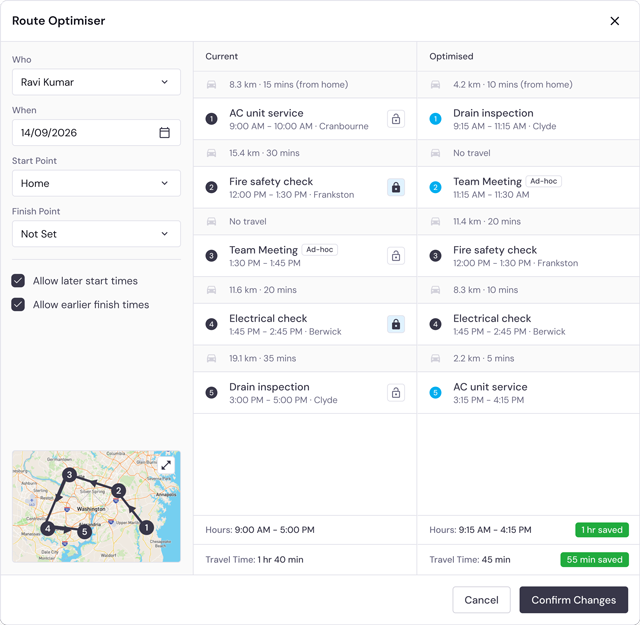
Route Optimiser
Same jobs. A smarter way around them.
AroFlo Route Optimiser compares a technician’s current job order with an optimised order for a chosen date, showing estimated travel distance, travel time and projected finish time for both. Locked appointments stay where they are. Nothing changes until your scheduler confirms it, one technician’s route at a time, so route planning starts from the work already booked.
Scheduling Optimiser
The right fit. Not just the first gap.
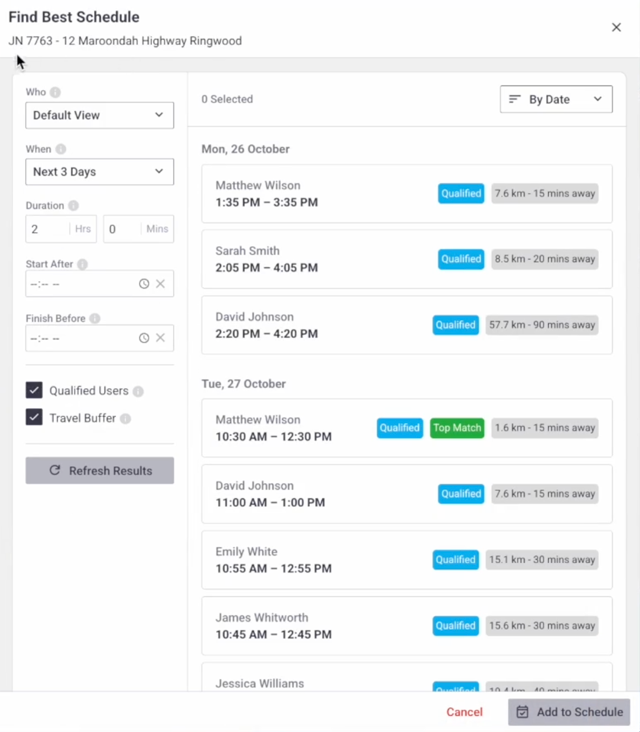
AroFlo Scheduling Optimiser recommends suitable technicians and appointment times for a new or urgent job, using the scheduled work already in AroFlo. It weighs availability, working hours, skills, location and travel together, ranks the options and suggests a top match. Your scheduler picks the appointment that fits.
AroFlo AI Scheduler never changes a job without your approval: it recommends, and your scheduler decides. Route Optimiser is started manually and works on one technician at a time, not automatic team-wide reassignment.
AroFlo Route Optimiser respects locked appointments, so fixed times stay put while the rest of the technician’s day is reordered around them.
When a technician calls in sick or an urgent job lands, run Scheduling Optimiser to see suitable technicians and appointment times, then run Route Optimiser on any affected technician’s day. AI Scheduler doesn’t reroute in real time or use live traffic.
AroFlo AI Scheduler is one paid add-on covering both Scheduling Optimiser and Route Optimiser. Existing customers view pricing and subscribe in the Billing Portal; new to AroFlo, request a demo.
AroFlo AI Scheduler works from the scheduled work already in AroFlo. Keep technician skills and working hours up to date, because the recommendations use them to find the right fit.
Travel times and savings from AroFlo Route Optimiser are estimates, and results vary by schedule. You see the estimated difference before confirming anything.
Get more from the team you already have.
Already on AroFlo? View pricing and activate AI Scheduler in your Billing Portal. Looking for broader job scheduling? Explore AroFlo scheduling.


