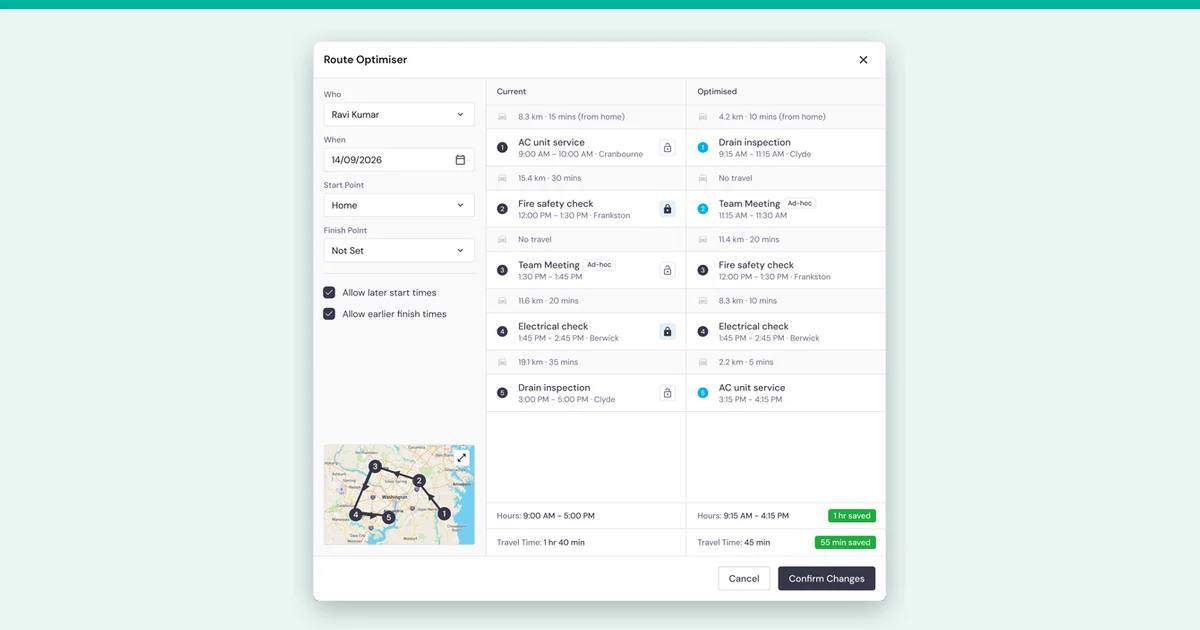
The best route optimisation software for an Australian field service team is the one that fits how you schedule work. Choose AroFlo AI Scheduler to plan routes inside your job management software, ServiceM8 if a small team schedules from a phone, or OptimoRoute to add a dedicated optimiser alongside your current job software. Salesforce Field Service suits enterprise operations.
AroFlo makes AI Scheduler and publishes this guide, so hold AI Scheduler to the same demo questions as every other tool. The table below compares eight tools on how routing works, who approves changes and the starting price each vendor lists. After it, you'll find a demo checklist, the Australian cost of travel between jobs and a way to measure savings on your own schedule.
Key takeaways
- Routing for field service is a scheduling problem. Skills, appointment times and urgent jobs matter as much as distance.
- Check who approves changes. Some tools recommend changes that a scheduler confirms, so ask each vendor how changes are applied.
- Prices come in different units, such as per user, per driver or per vehicle, and in different currencies. Compare the full monthly cost you'd pay for your team.
- Some Australian awards make travel between job sites paid time, so unnecessary travel uses paid hours that could go to work on site.
- Test any tool on a few weeks of your own jobs before you rely on a savings figure.
Route optimisation software compared
Each of these eight tools says it plans or optimises routes or schedules. They differ in where your job data lives, whether a person approves each change and how they charge. Use the table to shortlist two or three. Then read each tool's section for the detail and the limits you'll want to check in a demo.
| Tool | Best for | How routing works | Who approves changes | Starting price (as of November 2026) |
|---|---|---|---|---|
| AroFlo AI Scheduler | Australian field service businesses that want routing inside job management | Ranks suitable technicians for a job and reorders one technician's day at a time | The scheduler confirms each change | AroFlo starts at AUD $80 per user per month with a minimum of three users, plus the paid AI Scheduler add-on |
| ServiceM8 | Small teams that want routing on a phone | Auto Routing optimises one staff member's day from the iOS app | Ask the vendor. You choose whether it can move fixed-time bookings | Starter $29 a month with unlimited users and 50 jobs per month, in AUD including GST. Auto Routing is an add-on available in all plans |
| Jobber | Crews that want routes for the whole team at once | Builds routes for one person, a few team members or the entire crew | Ask the vendor | $29 a month billed annually, or $49 a month, for one pro, in USD |
| OptimoRoute | Businesses that want a dedicated route and schedule optimiser | Plans routes and schedules with technician skills, up to 5 weeks at a time | Ask the vendor | Pro plan example of $49 per driver, or $245 per month for 5 drivers |
| WorkWave RouteManager | Fleets that want route tracking beside an existing CRM | Accounts for rush hour, traffic patterns, load capacity and last-minute requests | Ask the vendor | As low as $54 per month per vehicle, with a minimum of 4 vehicles |
| Arrivy | Teams that want to test routes before they go live | Traffic-aware routes based on distance and ETAs in the Premium plan | Teams test routes before publishing them | Premium $50 per user, with a minimum of 3 users |
| Skedulo | Teams that schedule by skills, availability and location | Mastermind allocates work and plans routes across the operation | Ask the vendor | Custom quote |
| Salesforce Field Service | Enterprise service operations | Enhanced Scheduling and Optimisation automates workforce scheduling | Ask the vendor | Dispatcher licence AU$ 245 per user per month, billed annually |
These are the starting prices each vendor lists. Where a price doesn't show a currency, ask the vendor which currency it uses and whether GST applies before you compare.
What route optimisation software does for a field service business
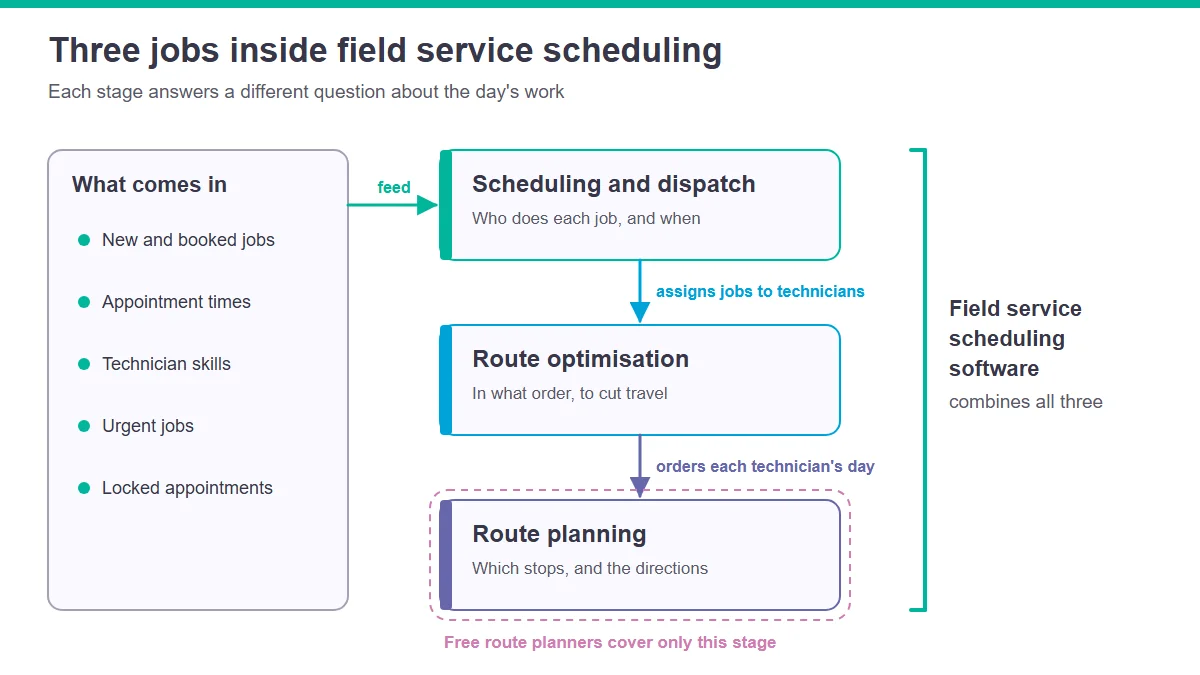
Route optimisation software puts a technician's jobs in the order that cuts travel while still meeting appointment times, skills and urgent work. Route planning software lists the stops, and scheduling and dispatch software decides who does each job and when. Field service scheduling software combines all three, because the right technician matters as much as the shortest drive.
A day with only a few jobs is already hard to solve by hand. Google's OR-Tools documentation explains that with ten locations, not counting the starting point, the number of possible routes is 362880. It adds that vehicle routing problems are inherently intractable, because the time it takes to solve them grows exponentially with the size of the problem. Customer time windows add another constraint, since a technician has to arrive inside the slot the customer booked.
That's a useful test for any tool you trial: does it plan around technicians, or only around stops?
What to look for before you choose
The right route optimisation software fits the way your office already schedules work. Before a demo, decide who should approve changes, which appointments can never move and how urgent jobs reach the field. Then ask each vendor to show those cases on your own jobs, rather than on a tidy sample day.
| What to check | Why it matters for field service | Question to ask in the demo |
|---|---|---|
| Who approves changes | Automatic changes move booked work without a person checking customer promises | Does the scheduler confirm each change, or does the tool apply it? |
| Locked appointments | Customers booked for a set time expect that time | Can we lock a job so optimisation plans around it? |
| Skills and qualifications | The nearest technician isn't always qualified for the job | Does it match jobs to skills, licences and preferred staff? |
| Urgent jobs | Breakdowns and call-outs arrive after the day is planned | How does it place an urgent job into a planned day? |
| Live traffic | Planned routes and real road conditions differ | Does it use live traffic, typical traffic or neither? |
| One technician or the whole team | Team-wide changes save more travel but move more bookings | Does it optimise one technician, a group or the whole team? |
| Where job data lives | Re-entering jobs in a second system costs office time | Does it work on jobs already in our job management software? |
| Pricing unit and currency | Per user, per driver and per vehicle pricing scale differently | What's our monthly cost for our team, in AUD, including GST? |
Here's what each of the eight tools publishes on these points in the sections below, starting with AroFlo's own.
AroFlo AI Scheduler
AroFlo AI Scheduler suits Australian field service businesses that want route and technician recommendations inside their job management software, with a scheduler approving every change. It is a paid add-on that combines route optimisation with technician scheduling recommendations. Scheduling Optimiser ranks suitable technicians for a job, and Route Optimiser reorders one technician's day at a time.
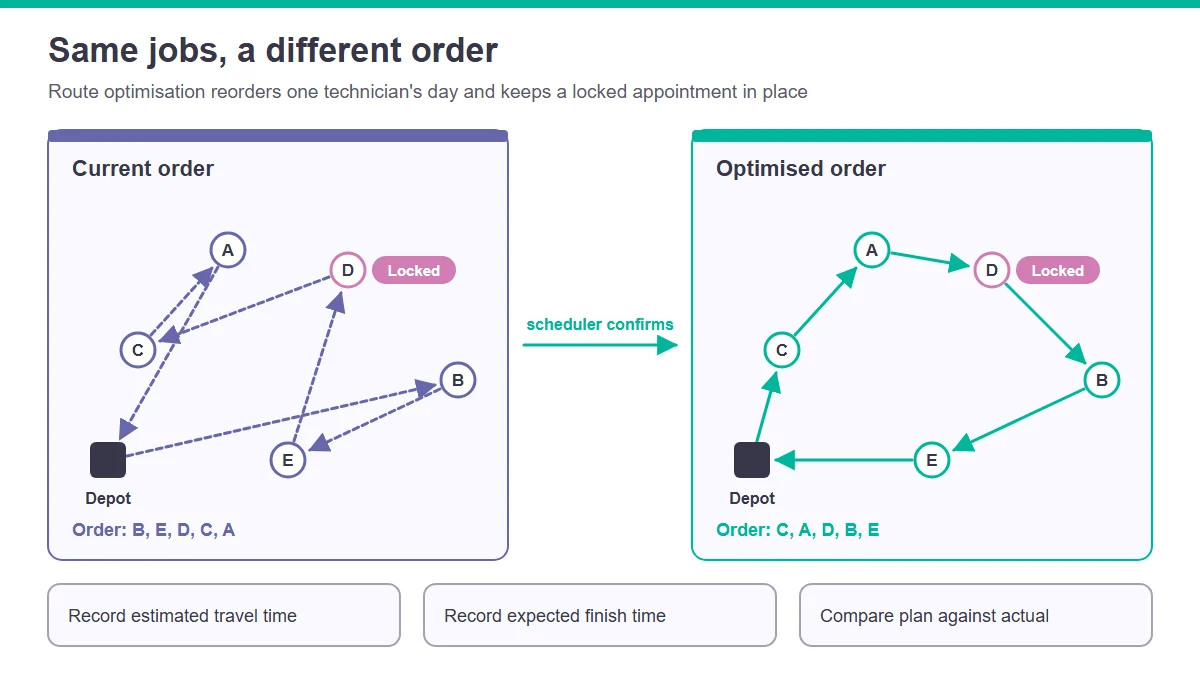
AroFlo's route optimisation software compares a technician's current job order with an optimised order for a chosen date, showing estimated travel distance, travel time and projected finish time for both. Locked appointments stay where they are, and nothing changes until your scheduler confirms it, one technician's route at a time. When a tech calls in sick or an urgent job lands, AI Scheduler recommends the right technician and time. Scheduling Optimiser weighs availability, working hours, skills, location and travel together, ranks the options and suggests a top match.
Check these limits in a demo. AI Scheduler doesn't reroute in real time or use live traffic, and you start Route Optimiser manually for one technician at a time. AroFlo describes its travel times and savings as estimates that vary by schedule. The recommendations rely on technician skills and working hours, so bring those records up to date before a trial.
AroFlo's job scheduling software can send emergency jobs to the geographically closest technician. It can also schedule only technicians with the right qualifications for a site and create recurring jobs automatically. Existing customers view AI Scheduler pricing and subscribe in the Billing Portal, and new customers can request a demo.
These customer stories describe AroFlo's scheduling and job management. They don't cover the AI Scheduler add-on.
Online Air and Solar, a solar, heating and cooling business serving Melbourne and regional Victoria, used to schedule by mobile phone and whiteboard. In AroFlo, schedule changes made in the office reach field staff straight away. Visibility of the location of all field staff shortened response times and reduced vehicle costs, according to its customer story.
New Plumbing Solutions schedules up to 30 jobs a day for its technicians in AroFlo and tracks each technician's location by GPS. Jarryd from the business says: "Knowing the location of each technician was a massive advantage, allowing Office staff to check the calendar and allocate the urgent job to the closest technician."
In AroFlo customer reviews, an administration manager wrote: "Scheduling of work has become less troublesome, easy to allocate and find all information in the one place".
ServiceM8
ServiceM8 suits small Australian teams that want routing on a phone. Its Auto Routing add-on optimises a staff member's schedule for the day with a single click, from the Map view in the iOS app. You can control whether it moves fixed-time bookings, which matters when customers have booked a set time.
ServiceM8 lists the Auto Routing add-on as available in all plans. Its Australian prices are in AUD and include GST, and the Starter plan is $29 a month with unlimited users and 50 jobs per month. Routing works per staff member, so the office still balances work across the team. Ask in the demo how it handles skills and urgent jobs.
Jobber
Jobber suits crews that want routes for the whole team at once. It builds the most efficient routes for one person, a few team members or an entire crew. When a delay, cancellation or new job changes the day, Jobber can re-optimise routes for any team member, so plans keep pace with the field.
Jobber lists a plan for one pro at $29 a month billed annually, or $49 a month, and states that all prices are in USD and exclude sales tax. Confirm which plan includes routing for your team size. Then work out the monthly cost in AUD before you compare it with local tools.
OptimoRoute
OptimoRoute suits businesses that want a dedicated route and schedule optimiser. It serves delivery and field service businesses, accounts for technician skills or qualifications when assigning tasks, and plans schedules up to 5 weeks at a time. It prices per driver, and you can try it free for 30 days before you buy a plan.
OptimoRoute gives a Pro plan example that works out at $49 per driver, or $245 per month for 5 drivers. If you run it beside your job management software, ask how jobs, completions and notes sync back. That way, the office doesn't enter work twice.
WorkWave RouteManager
WorkWave RouteManager suits fleets that want route planning and route tracking beside an existing CRM. It lets field service businesses schedule, track and manage routes in a few clicks. It accounts for rush hour, traffic patterns, load capacity and last-minute requests, and it connects to a CRM through an open API.
WorkWave RouteManager pricing is as low as $54 per month per vehicle, with a minimum of 4 vehicles required. Its open API connects with your CRM, and it integrates with Zapier. Per-vehicle pricing suits businesses that count vans rather than office users. If that's you, compare it against per-user tools on the size of your fleet.
Arrivy
Arrivy suits teams that want to test a route before it reaches the live schedule. It builds optimised routes based on distance, ETAs and traffic, and lets teams plan, test and optimise routes before publishing them. Route planning sits in the Premium plan, alongside digital forms, advanced reporting and integrations.
Arrivy lists Premium at $50 per user, starting with a minimum of 3 users. Its real-time SMS alerts are included for USA and Canada accounts and are an add-on for businesses in other regions, so an Australian business pays extra for real-time SMS alerts.
Skedulo
Skedulo suits mobile workforces that schedule by skills, availability and location. Its Mastermind engine combines optimisation algorithms and AI to allocate work and plan efficient routes across the operation. It schedules and dispatches field technicians based on skills, availability and location, then adjusts the schedule when the working day changes.
Ask Skedulo for its price at your team size and for the setup work involved. You'll need both to compare the full cost with the tools that list a price.
Salesforce Field Service
Salesforce Field Service suits enterprise service operations. Its Enhanced Scheduling and Optimisation automates workforce scheduling and reduces travel time. Salesforce says global enterprises can optimise thousands of jobs and resources in a single, seamless operation with intelligent clustering. Salesforce also requires at least one Service Cloud user licence for Field Service and Operations.
Salesforce Field Service lists the Dispatcher licence at AU$ 245 per user per month, billed annually. Technicians and contractors need at least one Dispatcher to use the scheduling tool. It's worth pricing the full licence set before you compare it with an all-in-one job management tool.
Built-in routing or a standalone route planner?
Built-in routing works on jobs already in your job management software, so skills, appointment times and job notes are there when the route is planned. A standalone optimiser can plan complex routes, but you'll have to move jobs between two systems. The better choice depends on where your team already records its work.
| Factor | Routing built into job management | Standalone route optimiser |
|---|---|---|
| Where job data lives | In the same system that holds quotes, jobs and invoices | In a separate system that receives jobs from your job software |
| Office workload | No second system to keep in step | Jobs, completions and notes need a sync or manual entry |
| Skills and appointment rules | Read from the technician and job records you already keep | Set up again in the routing tool |
| Pricing | Usually an add-on or plan feature of the job software | A separate subscription, often per driver or per vehicle |
Approval is the second big difference. A tool that re-optimises the whole team on its own can move bookings a customer was promised. A tool that recommends changes for a scheduler to confirm moves slower, but the office keeps control of customer promises. Decide which suits your business before the demo.
Free route planners and Google Maps: where they stop
Free route planners and Google Maps help a sole operator order a handful of stops. Google Maps limits how many stops one set of directions can take, and its help page explains how to reorder them. That covers a small day for one driver. It isn't a schedule for a team of technicians with skills and booked appointment times.
Google Maps Help says you can add up to 9 stops, which includes the final destination, and explains how to change the order of your stops. It also says the best route based on estimated traffic only works for routes with one destination. Google offers route optimisation separately to developers: its Route Optimization API generates optimised route plans for single or multiple vehicles.
RouteXL is free to use when you have not more than 20 addresses per route, and Routific says it is built for local delivery businesses. Both are built around stops. Before you rely on either for technicians, check how job details and appointment rules would reach them.
What travel between jobs costs an Australian field service business
Some Australian awards make travel between job sites paid working time for field service employees, and some add a per-kilometre allowance when an employee agrees to use their own vehicle. Unnecessary travel therefore uses paid time and, where an allowance applies, adds allowance costs. Route optimisation targets that cost when the schedule behind it is accurate.
The Plumbing and Fire Sprinklers Award says employees it covers who are transferred from one job site to another during ordinary working hours must be paid their ordinary rate of pay for the time occupied in travelling. Where the employer requests an employee to use their own vehicle for that transfer and the employee agrees, the award sets an allowance at the rate of $1.00 per kilometre.
For employees covered by the Electrical, Electronic and Communications Contracting Award, the employer must pay a motor vehicle allowance of $1.00 per kilometre when the employee, by agreement, uses their own vehicle. One case it covers is travel between the workshop or depot and a job, or between jobs. Check the award and any agreement that covers your team before you count savings.
If you are a sole trader or partnership claiming for a car, the ATO cents per kilometre method uses a rate that takes registration, fuel, servicing, insurance and depreciation into account. It allows a claim for a maximum of 5,000 business kilometres per car, per year.
Driving is also a safety risk. SafeWork SA says vehicle use on public roads is the most significant contributor to work-related traumatic injury and fatalities. Fewer unnecessary kilometres means less time on the road for your technicians.
In remote areas, distance adds up. Emperor Refrigeration is an Alice Springs business that serves regional and remote parts of the Northern Territory, South Australia and Western Australia. It stopped returning to base after every job once job cards and timesheets moved into AroFlo. General Manager Joe Pollitt says: "Every minute of the day is now productive time spent on site, which is a huge reduction in lost productivity."
How to measure travel-time savings
Don't trust any vendor figure until you've measured travel-time savings on your own jobs. Record a baseline from your current schedules, run the optimiser on the same days and compare estimated travel time and finish time. Then compare plan against actual after the work is done, because estimates and real days differ.
- Pick typical days. Choose days with your usual mix of booked, recurring and urgent jobs, and keep the same technicians in the test.
- Record the baseline. Note each technician's job order, estimated travel time and expected finish time from your current schedule.
- Run the optimiser on the same days. Keep locked appointments in place, then note the optimised job order, travel time and finish time the tool estimates.
- Compare plan against actual. After the work is done, compare the times technicians actually spent travelling with both plans. Live conditions change the result.
- Turn time into cost. Apply your award travel rules, any vehicle allowances and your vehicle running costs to the travel time you saved.
Run the test over at least a few weeks before you decide. A single quiet day won't show you much.
Which route optimisation software fits your business?
Your best route optimisation software depends on where your jobs live and who should approve changes. AroFlo AI Scheduler fits Australian businesses that want recommendations inside job management, ServiceM8 fits small teams routing from a phone, and OptimoRoute fits teams adding a dedicated optimiser. Enterprises compare Salesforce Field Service, and skills-led teams compare Skedulo.
- Routing inside job management, with a scheduler approving each change: AroFlo AI Scheduler.
- A small team scheduling from a phone: ServiceM8.
- Routes built for the whole crew at once: Jobber.
- A dedicated optimiser: OptimoRoute, or WorkWave RouteManager if you price by vehicle.
- Routes tested before they reach the live schedule: Arrivy.
- Scheduling by skills, availability and location: Skedulo.
- An enterprise service operation: Salesforce Field Service.
Shortlist two or three tools, then run the demo checklist and the measurement test on your own jobs.
Frequently asked questions
What is the best route optimisation app?
The best route optimisation app for a field service team fits its size and plans routes around jobs, skills and appointment times. AroFlo's AI scheduling software, AI Scheduler, suits Australian businesses that want recommendations a scheduler approves, while ServiceM8 suits small teams routing from a phone.
There's a better fit in the comparison table above for crews that want team-wide routes and for large enterprises.
Can ChatGPT optimize routes?
Check any route ChatGPT gives you. OpenAI says ChatGPT search results and citations can be incomplete, outdated, or incorrect. Google's routing documentation explains that solve time for vehicle routing problems grows exponentially with the size of the problem, so test routes on your own jobs.
Can Google Maps do route optimization?
Google Maps plans directions, but it isn't route optimization software. Google Maps Help says you can add up to 9 stops, which includes the final destination, and explains how to reorder them. Its best route based on estimated traffic only works for routes with one destination.
Plan your technicians' day with AroFlo
With AroFlo AI Scheduler, your scheduler sees suitable technicians ranked for a new or urgent job and an optimised job order for each technician's day, then confirms every change. Bring a real week of your own jobs to a demo and keep your locked appointments in place. Then compare the current and optimised order side by side.